I recently dug up my old Garmin Forerunner 305 (purchased back in 2008! woo hoo!). Apart from trying to maintain my fitness level (thoughts that usually happen in January! :-)), I also wanted to test out the accuracy of the heart rate monitor that came with my "old" Garmin device!

The motivation behind this investigation was the recent report of inaccuracy of the HR monitors on FitBit!
My (rather crude) investigation plan was as follows:
- Strap on my Forerunner 305 and head to the gym
- Keep peeping into the watch to check the heartrate and also check the HR noted by a state of the art Cybex machines at the gym
- Go for a jog in a nearby park with the GPS turned on
- Come back and map it using Google Maps or something like that and check the accuracy
Results from my manual investigation so far:
- HR is very accurate (for the levels I desire)
- GPS is also very accurate (for the levels I desire)
The Garmin device is pretty rugged and I'll save the $ I planned to spend a new sports device for sometime!
Now, I wanted to get a little Geeky. I needed to download the data my Mac. Garmin had updated all their software and I was totally missing the old software that allowed me to view and manipulate on my Mac locally!
Garmin seems to have recently released a software called Garmin Express that works perfectly on the latest OS X (I'm running El Capitan!). Everything is great but I need to download the data from their online service called Garmin Connect!
Bah! Too restricted for my taste!
I need the data on my local mac and I don't have the patience to download from Garmin Connect every time I need it!
So, I had to rollback into history! I managed to get the data through the following steps.
- Search for something old on Google related to "Forerunner" and "Mac" and yeah! "Download" :-). Thats what I exactly did limiting the results into history! garmin forerunner mac download - Google Search.
- To my good luck, Garmin Training Center popped up on the first page! Seemed familiar! Yeah! Thats the age old software from Garmin that worked flawlessly! :-)

-
Downloaded it from the archives at Garmin Training Center for Mac - CNET Download.com
-
Install and fire up Garmin Training Center for Mac and I have enough control over the data I need! Exporting the data is pretty darn easy! Just Right-Click on the Workout Activity and export!
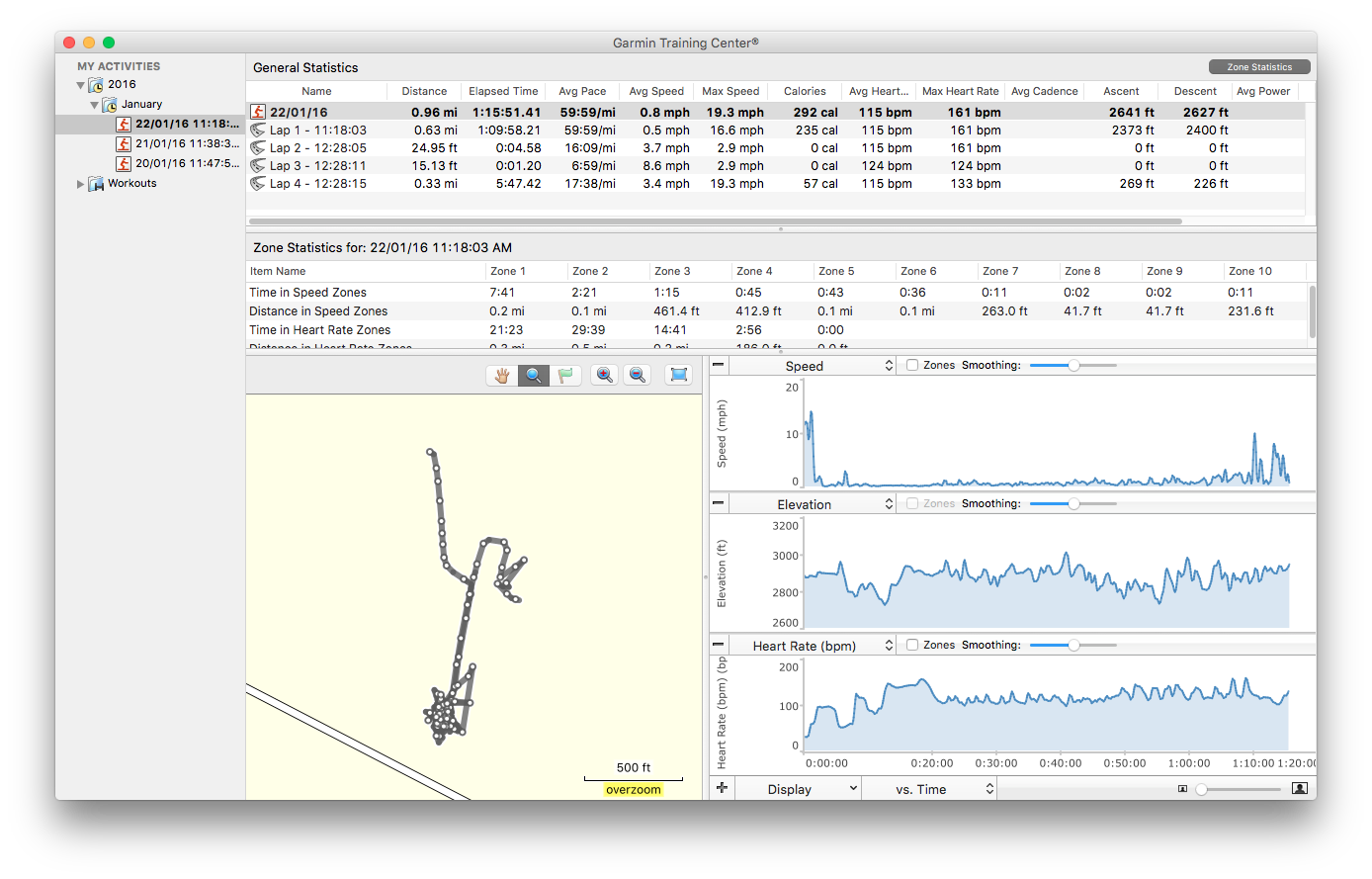
- To do next, play, manipulate, visualize and hack together a fitness app!
Love my Garmin Forerunner 305. Nice to have you back! :-)

Miscellaneous
- Through a Running Lens: It's The Little Things: Replacing Your Garmin 205, 305, or 405 Watchband with Something More Comfortable
- Expedition® Sport Wrap Watchband | Global Timex
- Nylon Watch Strap 22mm Olive Green Colour | eBay
- GPSBabel: convert, upload, download data from GPS and Map programs
- TrailRunner - Mac OS X route planning and journaling for iPhone, Nike+ SportBand, Garmin ForeRunner GPS
- LoadMyTracks | Easy GPS connectivity for your Macintosh
- Import TCX into R using XML package - Stack Overflow
- Mapping GPS Tracks in R | R-bloggers
- Garmin serial/USB protocol (garmin)