I've finally got to a long pending to-do-item to play with Apache Spark.
The following installation steps worked for me on Ubuntu 16.04.
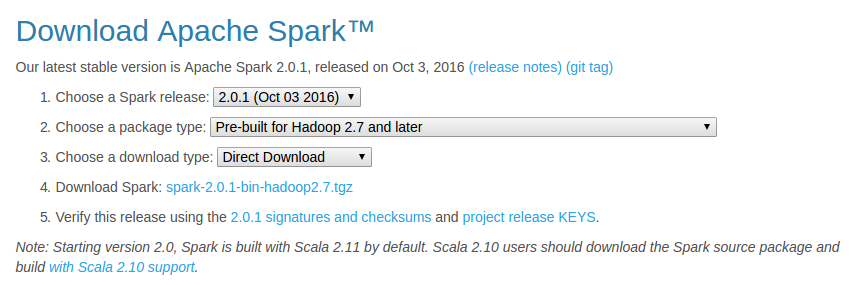
- Download the latest pre-built version from http://spark.apache.org/downloads.html
The below options worked for me:
- Unzip and move Spark
cd ~/Downloads/
tar xzvf spark-2.0.1-bin-hadoop2.7.tgz
mv spark-2.0.1-bin-hadoop2.7/ spark
sudo mv spark/ /usr/lib/
- Install SBT
As mentioned at sbt - Download
echo "deb https://dl.bintray.com/sbt/debian /" | sudo tee -a /etc/apt/sources.list.d/sbt.list
sudo apt-key adv --keyserver hkp://keyserver.ubuntu.com:80 --recv 2EE0EA64E40A89B84B2DF73499E82A75642AC823
sudo apt-get update
sudo apt-get install sbt
- Make sure Java is installed
If not, install java
sudo apt-add-repository ppa:webupd8team/java
sudo apt-get update
sudo apt-get install oracle-java8-installer
- Configure Spark
cd /usr/lib/spark/conf/
cp spark-env.sh.template spark-env.sh
vi spark-env.sh
Add the following lines
JAVA_HOME=/usr/lib/jvm/java-8-oracle
SPARK_WORKER_MEMORY=4g
- Configure IPv6
Basically, disable IPv6 using sudo vi /etc/sysctl.conf and add below lines
net.ipv6.conf.all.disable_ipv6 = 1
net.ipv6.conf.default.disable_ipv6 = 1
net.ipv6.conf.lo.disable_ipv6 = 1
- Configure .bashrc
I modified .bashrc in Sublime Text using subl ~/.bashrc and added the following lines
export JAVA_HOME=/usr/lib/jvm/java-8-oracle
export SBT_HOME=/usr/share/sbt-launcher-packaging/bin/sbt-launch.jar
export SPARK_HOME=/usr/lib/spark
export PATH=$PATH:$JAVA_HOME/bin
export PATH=$PATH:$SBT_HOME/bin:$SPARK_HOME/bin:$SPARK_HOME/sbin
- Configure fish (Optional - But I love the fish shell)
Modify config.fish using subl ~/.config/fish/config.fish and add the following lines
#Credit: http://fishshell.com/docs/current/tutorial.html#tut_startup

set -x PATH $PATH /usr/lib/spark
set -x PATH $PATH /usr/lib/spark/bin
set -x PATH $PATH /usr/lib/spark/sbin
- Test Spark (Should work both in fish and bash)
Run pyspark (this is available in /usr/lib/spark/bin/) and test out.
For example ....
>>> a = 5
>>> b = 3
>>> a+b
8
>>> print(“Welcome to Spark”)
Welcome to Spark
## type Ctrl-d to exit
Try also, the built in run-example using run-example org.apache.spark.examples.SparkPi
That's it! You are ready to rock on using Apache Spark!
Next, I plan to checkout analysis using R as mentioned in http://www.milanor.net/blog/wp-content/uploads/2016/11/interactiveDataAnalysiswithSparkR_v5.pdf