Upgrading the previous versions of Ghost was easy as mentioned in my previous post on Upgrading Ghost.
However, I was running into issues with upgrading to v1.0.0. In this post, I will cover the steps I followed to run Ghost v1.0.0 with Sqllite
Backup First
zip -r thoughts_$(date +%Y-%m-%d-%H.%M.%S).zip thoughts
s3cmd put thoughts_$(date +%Y-%m-%d-%H)*  s3://tempbin
Install fresh - Ghost
Apparently Node v6 installed via NodeSource is required.
Actually, node 6.5.0 is the best suited option as mentioned at Supported Node Versions
Since, I use n. I'll set the default node version using sudo n 6.5.0. I will need to revert to sudo n 4.4.2
Get exact node path using n bin 8.2.1 --version
Install ghost-cli
sudo npm i -g ghost-cli
Migrate to Ghost 1.0.0
The migration from <1.0 versions is apparently complicated
Hell!! I need to follow a migrating plan! as explained on Migrating to 1.0.0
Export all data using the Export button at Settings - Labs - Santosh writes here
Content folder backup using:
mkdir -p tmp
cp -r thoughts/content tmp/content-backup
Install Ghost 1.0.0
# Remove old files
rm -rf thoughts/*

# Change to ghost directory
cd thoughts

# Set Node to overcome version issues
sudo n 6.5.0

# Check for node version
node --version

# Install Ghost
# Planning to use sqlite as mentioned here [install](https://docs.ghost.org/v1.0.0/docs/cli-install#section-options)
# Ghost now installs with MySQL as default!

ghost install local

n bin 6.5.0 --version
# /usr/local/n/versions/node/6.5.0/bin/node
Setup configuration
Create config.production.json (just copied config.development.json and modified
Create a new user by going to https://www.santoshsrinivas.com/ghost/
Import post content!
Then import json content file using: https://www.santoshsrinivas.com/ghost/#/settings/labs
Next, copy images using:
cd content/
cp -R ../../tmp/content-backup/images/ .
That's it! The new theme actually looks very nice! So, I retain it!!
Troubleshooting
Debug Start
As explained at: start
ghost run
ghost run --development
Upgrading Ghost
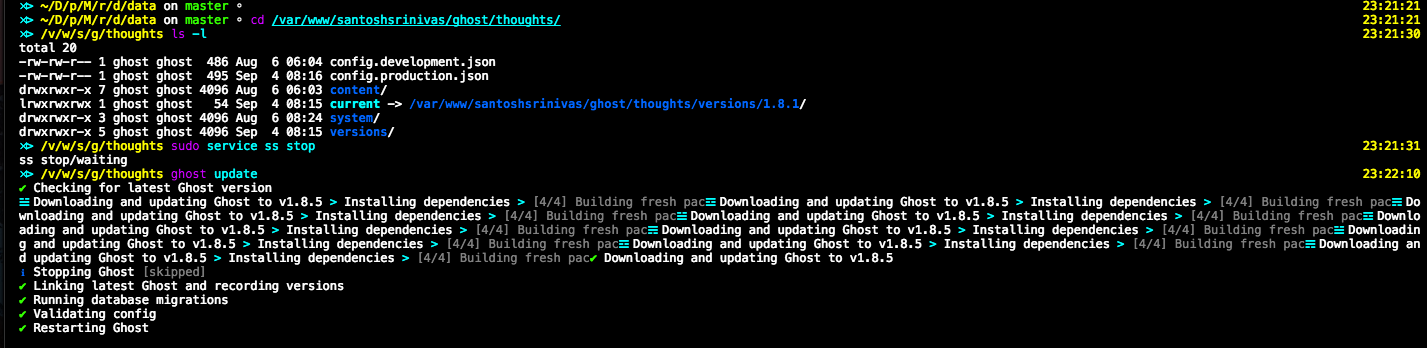
Ghost now can easily be updated to future releases using ghost-cli
Just run ghost update
Troubleshooting
When I tried to upgrade to 1.17.1. I was running into a ton of issues with respect to installing ghost and getting the sqlite database to work
The following points seem to have helped me getting it running:
zip -r  thoughts_$(date +%Y-%m-%d-%H.%M.%S).zip thoughts

Change to node 8.9.0

Uninstall ghost-cli

Install ghost-cli

ghost setup migrate

ln -s /var/www/santoshsrinivas/ghost/thoughts/versions/1.17.1 /var/www/santoshsrinivas/ghost/thoughts/current

ln -s /var/www/santoshsrinivas/ghost/thoughts/current/content/themes/casper /var/www/santoshsrinivas/ghost/thoughts/content/themes/casper
EDIT: Apparently, as I recently learned from this post, ghost can be installed using sqlite with this command:
ghost install --db sqlite3